


A number of controls are provided to assist in detailed viewing and labeling. You must click on a button to enter a mode of operation before using that particular function

Move the mouse over the image and click on the image. If in a labeled region, the label will be outlined and its name appear in the caption box beneath the image.

Click and drag to move the image around the screen.

Zoom into or out of the image.

Resize the image according to the size of the labeling window.

Displays the current zoom factor.
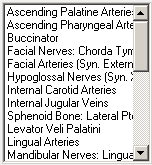
Clickable list of labels on the image.
Videos download and display in a window external to the program, most likely to be a Windows Media Player window.